
- Joined
- Jun 24, 2026
- Messages
- 9
- Media
- 20
- Reaction score
- 8
- Current Ride
- 2026 Ram RHO - Forged Blue
- Current Ride #2
- 2019 BMW 440i Coupe
- Military
- Army
I enjoy this forum and the help this community provides. I could not find a thorough sub installation thread so I created this one.
I will start with, I am not a certified professional, I have installed this same equipment and setup in my 2014 Ram 1500 Laramie w/Alpine, 2021 Ram 1500 Laramie w/Alpine, and now my 2026 Ram RHO, so use a test light and multimeter to verify your own truck. The online wiring diagrams I searched before attempting this differed wildly so I used my past experience to take on this installation. I did find that even with the different electrical architecture, some things were the same, which is why I included my Escort smart cord remote and upper-dash 12v switched power change in this install. I took some risks in the inside fuse panel so follow these instructions at your own risk, your mileage will vary.
My Ram RHO subwoofer installation
Equipment:
-Crossfire mono class D amplifier
-Audio Control LC2i Pro
-Two reused 10" ProBox subwoofer speakers in a replacement under-seat enclosure,
-Optional: Escort Smart Cord hardwire installation
-Optional: F54 position A-to-B change for switched 12v upper dash power.
*I kept the ProBox subwoofer speakers from the original box in my 2014 truck. When I bought the 2021 truck, the space under the rear seat had a different configuration, so I changed the enclosure and transferred the same speakers into it. That replacement enclosure is the one shown here in the 2026 RHO.
The fuse locations and results below describe my truck. They are not an OEM wiring specification or a universal recommendation.
1. Check the interior fuse panel
The first fuse-panel image is an outside reference I used from fusebox.net, not my actual fuse box. Its cavity numbers matched up, but fuses were present in some locations that did not match my truck. The later fuse-tap photos show my actual panel. Do not copy fuse occupancy or ratings from the reference image.
I checked every fuse in the interior fuse box with a test light to determine whether it was powered with the ignition on or off, and used a multimeter for this installation. I checked for retained-accessory-power and sleep delay, before selecting a circuit.
Use the supplied fuse map as a location reference only.

Outside fuse-panel reference images from fusebox.net—not a photograph of my truck. The cavity numbers matched, but some occupied fuse locations differed from my 2026 RHO. Use it only to locate numbers; use my actual-panel photos and verify your own truck for fuse population, ratings, and power behavior.
2. Bonus: F54 switched 12V
I remembered from my previous trucks that in the owners manual you could change the upper dash 12v power socket to a ignition switched option. This prompted me to check my current owners manual but that information is not listed. What was listed was the fuse location. I knew that these fuses went into an A & B side so I used my test light to confirm what I was guessing on. I moved F54 from position A to position B to obtain switched 12V for the accessory outlet and it worked. The before and after images identify the positions I used.
It is easy and you simply pull the fuse, move it to the right and you are using the B plug.

F54 before the change, labeled position A. Verify the position and outlet power behavior on your truck.
3. F26 radar power and F49 amplifier remote
I used F26 (MOD CLUSTER CCN / MOD SGW (CYBERSECURITY)) (10amp) for the radar-detector hardwire circuit with a 10 amp fuse and F49 (MOD SEAT HEATER FRT (STRNG WHL)) (15Amp) for the amplifier remote turn-on circuit. The F49 accessory branch used a 5A fuse in my installation. This is the low-current remote circuit, not the amplifier’s main power supply.
F26 (MOD CLUSTER CCN / MOD SGW (CYBERSECURITY)) is a sensitive circuit: this photograph is a record of my installation, not an endorsement of tapping it on your truck. This is the gamble. I will likely change this to use F54 in the future.
Preserve the original vehicle fuse and its specified rating. The accessory branch requires its own independently sized fuse appropriate to the device, wire, and tap limits. My 5A choice is not a universal fuse recommendation but I know I will never need more power than that.
Verify add-a-fuse orientation using the tap manufacturer’s diagram and the measured supply side of the fuse cavity. Identify the tap’s common input blade and the two protected outputs; orient it so the original circuit and accessory each remain protected by their intended fuse. Do not infer orientation from wire direction, fuse color, or these photos.

F26 radar-detector fuse tap, F49 amplifier remote fuse tap, and F54 in position B. This records my installation; verify circuit suitability and tap orientation independently.
4. Dash switch, hardwire controls, and accessory grounds
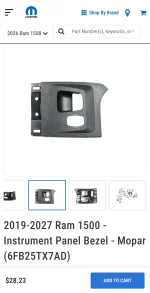
I installed a pushbutton amplifier on/off switch in the lower dash panel. Sometimes my passenger princess says the bass is too loud; this is a lesson from the old days when I had two 15's in the trunk... anyway, It sits slightly offset and might annoy me in the future. If you make a mistake drilling the switch opening, the replacement-panel option I found is Mopar instrument-panel bezel 6FB25TX7AD, shown in the product screenshot. This is a backup replacement option.
The collage shows the lower-panel access area and the grounding points I used for the Escort smart cord and amplifier switch because they both require a ground. Because the switch has a light, it needed its own ground. Check for a sound electrical connection; do not assume every visible bracket is an adequate ground. These are accessory grounds, not a main amplifier ground. I used a screw with a nylon locknut to secure the ground wires to protect against vibration into the holes that already existed. (I drilled my own amplifier ground in the floor of the truck and stripped the paint down to bare metal in the back of the cab near the amp.)
I zip tied and used cloth tape to follow the factory wires.

Lower-dash panel access and the accessory grounding points used for the Escort Smart Cord and amplifier on/off switch. The inset shows a screw and nylon-insert locknut. These locations are not a main amplifier ground specification.

Amplifier on/off switch installation, viewed from the side and rear of the lower dash panel. These holes are already there.

Amplifier on/off switch: blue ring illuminated in the ON view and unlit in the OFF view. The switch sits slightly offset in the panel.
Amazon: APIELE 10 Amp 22mm Latching Push Button Switch 12V Angel Eye LED Waterproof Aluminum Alloy Round Self-Locking 7/8'' 1NO 1NC 1 Pack (10 Amp/Blue Led)
Finished lower dash: amplifier on/off switch on the left and LC2i Pro level control nearer the center console
Replacement instrument-panel bezel, Mopar 6FB25TX7AD, shown as a backup if drilling the amplifier on/off switch opening goes wrong.
5. Signal interface and ANC bypass
NET Audio has a T-splice option that plugs into the subwoofer location but it is unavailable without their included line output converter (LOC) at the time it costs, $176 + shipping. I already had the Audio Control LC2i Pro and it does that already. If you need a LOC to connect your amp, you will need this whole connection.
You also need an ANC bypass, the Alpine ANC bypass was not compatible so, I purchased the NET Audio “2025-up Dodge Ram Harman Kardon Audio ANC Bypass Harness” from netaudio.com, shown in the product screenshot, and it worked in my 2026 RHO. I paid $11 + $22 for shipping. The next photo compares the actual connection before and after installation.
To splice in the sub to connect to the Audio Control LC2i to the HK subwoofer, I used my multimeter to check ohms and continuity and to validate the wiring from all the wire-color references: I found this to be true for my truck: Gray/Brown — Channel 1 (+); Green/Brown — Channel 1 (−); Gray/White — Channel 2 (+); Green/White — Channel 2 (−). Verify the connector, channel pairing, and polarity for your truck before connecting.

My Factory HK subwoofer and its connector, before the signal-tap close-up.

Signal-tap close-up at the factory HK subwoofer connector. My red T-taps installed.
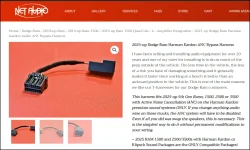
Product screenshot of the NET Audio “2025-up Dodge Ram Harman Kardon Audio ANC Bypass Harness” I purchased. This is the bypass that worked in my 2026 RHO; the next photo shows the actual before-and-after connection.

HK ANC connection before and after the NET Audio bypass: AFTER at the top, BEFORE at the bottom. This is the installed bypass arrangement.
6. Behind-seat amplifier and power distribution
My original plan was to attach the amplifier and LC2i Pro to the carpet with a cut 3/4 plywood square attached to the back wall of the truck. The carpet did not sit flush because of the other electronics on the back wall, so I changed the mounting approach.
I used Loctite construction adhesive to mount the 3/4-inch plywood to the back wall in the only open spot, and let it cure for 48 hours. That is the L shaped plywood you see.
I mounted the Crossfire amplifier and LC2i Pro on 3/4-inch plywood behind the rear seat and used 4-gauge power distribution.
I cut the carpet to shape around the mounted equipment to let air reach the amplifier and keep it concealed from view, even with the middle seat folded down. The plywood supports the equipment; the carpet cutout is for clearance, airflow, and concealment with the middle seat folded down.

Crossfire mono amplifier and AudioControl LC2i Pro mounted on 3/4-inch plywood behind the rear seat. The distribution block receives the 4-gauge battery feed.

Carpet trim cut around the equipment on the plywood board. I made the cutout to provide airflow around the amplifier while keeping it concealed from view, including with the middle seat folded down. The cutout reflects my installation.

End Part 1.
I will start with, I am not a certified professional, I have installed this same equipment and setup in my 2014 Ram 1500 Laramie w/Alpine, 2021 Ram 1500 Laramie w/Alpine, and now my 2026 Ram RHO, so use a test light and multimeter to verify your own truck. The online wiring diagrams I searched before attempting this differed wildly so I used my past experience to take on this installation. I did find that even with the different electrical architecture, some things were the same, which is why I included my Escort smart cord remote and upper-dash 12v switched power change in this install. I took some risks in the inside fuse panel so follow these instructions at your own risk, your mileage will vary.
My Ram RHO subwoofer installation
Equipment:
-Crossfire mono class D amplifier
-Audio Control LC2i Pro
-Two reused 10" ProBox subwoofer speakers in a replacement under-seat enclosure,
-Optional: Escort Smart Cord hardwire installation
-Optional: F54 position A-to-B change for switched 12v upper dash power.
*I kept the ProBox subwoofer speakers from the original box in my 2014 truck. When I bought the 2021 truck, the space under the rear seat had a different configuration, so I changed the enclosure and transferred the same speakers into it. That replacement enclosure is the one shown here in the 2026 RHO.
The fuse locations and results below describe my truck. They are not an OEM wiring specification or a universal recommendation.
1. Check the interior fuse panel
The first fuse-panel image is an outside reference I used from fusebox.net, not my actual fuse box. Its cavity numbers matched up, but fuses were present in some locations that did not match my truck. The later fuse-tap photos show my actual panel. Do not copy fuse occupancy or ratings from the reference image.
I checked every fuse in the interior fuse box with a test light to determine whether it was powered with the ignition on or off, and used a multimeter for this installation. I checked for retained-accessory-power and sleep delay, before selecting a circuit.
Use the supplied fuse map as a location reference only.
Outside fuse-panel reference images from fusebox.net—not a photograph of my truck. The cavity numbers matched, but some occupied fuse locations differed from my 2026 RHO. Use it only to locate numbers; use my actual-panel photos and verify your own truck for fuse population, ratings, and power behavior.
2. Bonus: F54 switched 12V
I remembered from my previous trucks that in the owners manual you could change the upper dash 12v power socket to a ignition switched option. This prompted me to check my current owners manual but that information is not listed. What was listed was the fuse location. I knew that these fuses went into an A & B side so I used my test light to confirm what I was guessing on. I moved F54 from position A to position B to obtain switched 12V for the accessory outlet and it worked. The before and after images identify the positions I used.
It is easy and you simply pull the fuse, move it to the right and you are using the B plug.
F54 before the change, labeled position A. Verify the position and outlet power behavior on your truck.
3. F26 radar power and F49 amplifier remote
I used F26 (MOD CLUSTER CCN / MOD SGW (CYBERSECURITY)) (10amp) for the radar-detector hardwire circuit with a 10 amp fuse and F49 (MOD SEAT HEATER FRT (STRNG WHL)) (15Amp) for the amplifier remote turn-on circuit. The F49 accessory branch used a 5A fuse in my installation. This is the low-current remote circuit, not the amplifier’s main power supply.
F26 (MOD CLUSTER CCN / MOD SGW (CYBERSECURITY)) is a sensitive circuit: this photograph is a record of my installation, not an endorsement of tapping it on your truck. This is the gamble. I will likely change this to use F54 in the future.
Preserve the original vehicle fuse and its specified rating. The accessory branch requires its own independently sized fuse appropriate to the device, wire, and tap limits. My 5A choice is not a universal fuse recommendation but I know I will never need more power than that.
Verify add-a-fuse orientation using the tap manufacturer’s diagram and the measured supply side of the fuse cavity. Identify the tap’s common input blade and the two protected outputs; orient it so the original circuit and accessory each remain protected by their intended fuse. Do not infer orientation from wire direction, fuse color, or these photos.
F26 radar-detector fuse tap, F49 amplifier remote fuse tap, and F54 in position B. This records my installation; verify circuit suitability and tap orientation independently.
4. Dash switch, hardwire controls, and accessory grounds
I installed a pushbutton amplifier on/off switch in the lower dash panel. Sometimes my passenger princess says the bass is too loud; this is a lesson from the old days when I had two 15's in the trunk... anyway, It sits slightly offset and might annoy me in the future. If you make a mistake drilling the switch opening, the replacement-panel option I found is Mopar instrument-panel bezel 6FB25TX7AD, shown in the product screenshot. This is a backup replacement option.
The collage shows the lower-panel access area and the grounding points I used for the Escort smart cord and amplifier switch because they both require a ground. Because the switch has a light, it needed its own ground. Check for a sound electrical connection; do not assume every visible bracket is an adequate ground. These are accessory grounds, not a main amplifier ground. I used a screw with a nylon locknut to secure the ground wires to protect against vibration into the holes that already existed. (I drilled my own amplifier ground in the floor of the truck and stripped the paint down to bare metal in the back of the cab near the amp.)
I zip tied and used cloth tape to follow the factory wires.
Lower-dash panel access and the accessory grounding points used for the Escort Smart Cord and amplifier on/off switch. The inset shows a screw and nylon-insert locknut. These locations are not a main amplifier ground specification.
Amplifier on/off switch installation, viewed from the side and rear of the lower dash panel. These holes are already there.
Amplifier on/off switch: blue ring illuminated in the ON view and unlit in the OFF view. The switch sits slightly offset in the panel.
Amazon: APIELE 10 Amp 22mm Latching Push Button Switch 12V Angel Eye LED Waterproof Aluminum Alloy Round Self-Locking 7/8'' 1NO 1NC 1 Pack (10 Amp/Blue Led)
Finished lower dash: amplifier on/off switch on the left and LC2i Pro level control nearer the center console
Replacement instrument-panel bezel, Mopar 6FB25TX7AD, shown as a backup if drilling the amplifier on/off switch opening goes wrong.
5. Signal interface and ANC bypass
NET Audio has a T-splice option that plugs into the subwoofer location but it is unavailable without their included line output converter (LOC) at the time it costs, $176 + shipping. I already had the Audio Control LC2i Pro and it does that already. If you need a LOC to connect your amp, you will need this whole connection.
You also need an ANC bypass, the Alpine ANC bypass was not compatible so, I purchased the NET Audio “2025-up Dodge Ram Harman Kardon Audio ANC Bypass Harness” from netaudio.com, shown in the product screenshot, and it worked in my 2026 RHO. I paid $11 + $22 for shipping. The next photo compares the actual connection before and after installation.
To splice in the sub to connect to the Audio Control LC2i to the HK subwoofer, I used my multimeter to check ohms and continuity and to validate the wiring from all the wire-color references: I found this to be true for my truck: Gray/Brown — Channel 1 (+); Green/Brown — Channel 1 (−); Gray/White — Channel 2 (+); Green/White — Channel 2 (−). Verify the connector, channel pairing, and polarity for your truck before connecting.
My Factory HK subwoofer and its connector, before the signal-tap close-up.
Signal-tap close-up at the factory HK subwoofer connector. My red T-taps installed.
Product screenshot of the NET Audio “2025-up Dodge Ram Harman Kardon Audio ANC Bypass Harness” I purchased. This is the bypass that worked in my 2026 RHO; the next photo shows the actual before-and-after connection.
HK ANC connection before and after the NET Audio bypass: AFTER at the top, BEFORE at the bottom. This is the installed bypass arrangement.
6. Behind-seat amplifier and power distribution
My original plan was to attach the amplifier and LC2i Pro to the carpet with a cut 3/4 plywood square attached to the back wall of the truck. The carpet did not sit flush because of the other electronics on the back wall, so I changed the mounting approach.
I used Loctite construction adhesive to mount the 3/4-inch plywood to the back wall in the only open spot, and let it cure for 48 hours. That is the L shaped plywood you see.
I mounted the Crossfire amplifier and LC2i Pro on 3/4-inch plywood behind the rear seat and used 4-gauge power distribution.
I cut the carpet to shape around the mounted equipment to let air reach the amplifier and keep it concealed from view, even with the middle seat folded down. The plywood supports the equipment; the carpet cutout is for clearance, airflow, and concealment with the middle seat folded down.
Crossfire mono amplifier and AudioControl LC2i Pro mounted on 3/4-inch plywood behind the rear seat. The distribution block receives the 4-gauge battery feed.
Carpet trim cut around the equipment on the plywood board. I made the cutout to provide airflow around the amplifier while keeping it concealed from view, including with the middle seat folded down. The cutout reflects my installation.
End Part 1.

 .
.