Nopeis there a way to force an OTA update? I'm not seeing it show up.
Sir you are a rockstar! Thank you for providing this info.Settings > drive theme > display sync. Uncheck that.
I got the same message after the update. Wanted to see what it consisted of. When I clicked on the button it said ,"failed to retrieve information ". I took a picture of the updated version number and asked Google ai what the update was/did. Gave a lengthy In depth response.Now if it's actually right that's another story. Lol. I did notice that the gas pedal and shifts seemed more crisp. My wireless android auto has been connecting quickly and trouble free so far. The u connect screen response seems faster and less lagging. So far that's what I've noticed.Does anyone know what this update does? I tried selecting that option prior to the update but it wasn't able to fetch the details.
What model year is your truck. Just curious if I should go hook my truck up to wifi to see if it will try downloading something. Mine is a 26 (ordered dec 25). Also are you guys doing anything/is there a way to force it to search for an update, or is it just a matter of having it connect to wifi?I got the same message after the update. Wanted to see what it consisted of. When I clicked on the button it said ,"failed to retrieve information ". I took a picture of the updated version number and asked Google ai what the update was/did. Gave a lengthy In depth response.Now if it's actually right that's another story. Lol. I did notice that the gas pedal and shifts seemed more crisp. My wireless android auto has been connecting quickly and trouble free so far. The u connect screen response seems faster and less lagging. So far that's what I've noticed.
Mine is a 2026 built in April. I have my wifi update turned off. I got the notification to update when I shut the truck off at work. It said estimated install time was 26 minutes. Asked if I wanted to update now or later I went ahead and selected now and let it do its thing. The screen stayed on when I opened the door to get out of the truck to go into work. Came out started the truck said it was updated and ifvi wanted to see what the updated information was to click the ok button. I did but the got the message failed to fetch the update information.What model year is your truck. Just curious if I should go hook my truck up to wifi to see if it will try downloading something. Mine is a 26 (ordered dec 25). Also are you guys doing anything/is there a way to force it to search for an update, or is it just a matter of having it connect to wifi?
Also there is no way to force an update that I am aware ofWhat model year is your truck. Just curious if I should go hook my truck up to wifi to see if it will try downloading something. Mine is a 26 (ordered dec 25). Also are you guys doing anything/is there a way to force it to search for an update, or is it just a matter of having it connect to wifi?
Do you have a current data plan/hotspot for your truck?Mine is a 2026 built in April. I have my wifi update turned off. I got the notification to update when I shut the truck off at work. It said estimated install time was 26 minutes. Asked if I wanted to update now or later I went ahead and selected now and let it do its thing. The screen stayed on when I opened the door to get out of the truck to go into work. Came out started the truck said it was updated and ifvi wanted to see what the updated information was to click the ok button. I did but the got the message failed to fetch the update information.
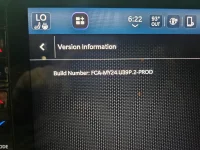
Im not paying of anything extra in regards to that. I turned off my wifi update shortly after getting the truck because it seemed to cause a conflict with my android auto connection at the time. I haven't turned it on since. Also here is a picture of my updated build number for reference.Do you have a current data plan/hotspot for your truck?
Thank you for the info and the photo. Just checked my build number and it's the same as yours.Im not paying of anything extra in regards to that. I turned off my wifi update shortly after getting the truck because it seemed to cause a conflict with my android auto connection at the time. I haven't turned it on since. Also here is a picture of my updated build number for reference.
Not sure if it's related to the update, but my Android Auto will not connect . Tried soft reset (pushing the volume and tune button simultaneously) and it will not reset, does nothing. This just happened after the update, so I guess I'm going to have to take it in. noth those bu

Push and hold both those buttons down for 15 seconds. It will reset. Takes 15 secondsNot sure if it's related to the update, but my Android Auto will not connect . Tried soft reset (pushing the volume and tune button simultaneously) and it will not reset, does nothing. This just happened after the update, so I guess I'm going to have to take it in.
The trucks rolling off line now have a newer version, but that newer version hasn't been OTA rolled to the fleet. Also not available at dealership (I got two RSUs done yesterday and they checked UConnect as well).Thank you for the info and the photo. Just checked my build number and it's the same as yours.