
- Joined
- Dec 9, 2025
- Messages
- 6
- Reaction score
- 5
- Current Ride
- 2026 Ram RHO
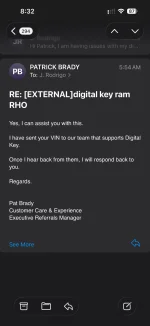
I have a Samsung as well. You don't need to turn off all that stuff! In the Wallet app, there is a toggle to turn off "in range" messages.UPDATE: I waited 18 months to get my digital key. Had it 2 days. No bueno for me. If you have a Samsung phone, I have the S25+, the digital key function is a pain in ass. The digital key itself has to go in your Samsung wallet. It automatically switches on your Bluetooth and the wallet constantly sends you messages that your key is in range even if youre sitting in your house. The fix is to disable your UWB (ultra wide band) connection. But you need it to open your truck without touching your phone on the door or putting your phone on top of the wireless charger for an NFC connection to start the truck. Another fix from the constant truck in range message is to turn off passive entry. But that again makes it so you have to touch the door. I live in a 3000 sq ft single story home and no matter where I am in the house i get the truck in range message. So I have to turn uwb off in the house then turn it back on on the way to the truck. Along with Bluetooth. I would rather just carry a fob in my pocket and do nothing. I keep the fob in a Faraday bag in the home so as not to wake up the truck. I dont know if Apple is like this but its not convenient on a Samsung. AT ALL. Unpaired, final answer.
Open the Wallet app, choose the "All" menu at the bottom (right next to Quick Access). In the upper right, click the 3 dots menu and Settings. Near the bottom is "Notifications" - Choose that and then Digital keys. Turn it off
Hope that helps!


 Crucial Step for iPhone/Android to actually complete the pair: