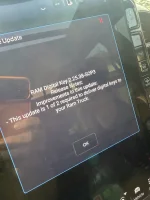
It wont move. Just shut the truck and get out. Leave it unlocked for about an hour. It will update and say that it did next start.It does. Connecting bar never moves even after several minutes
I had to turn my phone off and on and then it worked. It was doing the stuck in “connecting” until I tried that. I also had to hold the top of my phone to the charging pad, not place my phone in the holder.Does it do the deal where you get to the apple step, set your phone on the charging pad and it just says "connecting..." forever?
Same here. TSB applied. The SPAAK file process required about 6 module updates, then the tile finally showed up. All in all, took about 4 hrs with a battery tender and I waited for it.
Did you receive this update before or after the Uconnect update?Just got this update after work
the only update i have ever received in this truck is the R5T update which i got not long ago then this one. my uconnect is still the same as most everyone else's here: fca-my24.u35.26-proDid you receive this update before or after the Uconnect update?
Thanks for the details. Looks like I might be on the same path which is making me hopeful, although the TSB was different but a quick google search appears that this one is superseding. 2025 with a 12/2024 build date.the only update i have ever received in this truck is the R5T update which i got not long ago then this one. my uconnect is still the same as most everyone else's here: fca-my24.u35.26-pro
my history so far in this order with any and all updates:
Dealer Performs TSB 08-340-25 -- Jul 16
Receive R5T Update -- Jul 29
Receive unknown update that fails to install -- Jul 31
Receive 2.25.38-SOP3 update -- Aug 4
I should note the R5T update was only thing so far that has actually added or changed anything that i can notice. it actually enabled a new feature in the app to enable ventilation or w/e
Weird I use wireless CarPlay every single day and no issues really, I think maybe my only ever issues were weird hitching/skipping of sounds but it was fixed with a reboot of the phone not the truck so assume it was a iOS bug not truck. I’ve actually have never listened to any other form of content in this truck that didn’t come over CarPlay so no idea if the other stuff works or not lolI got the update on my 2026 as well as my app for the digital key. i need to take a few minutes and see if it works. considering how bad carplay is i have little faith but we will see.
I got it working.It wont move. Just shut the truck and get out. Leave it unlocked for about an hour. It will update and say that it did next start.
I don’t think anyone really knows how to get the digital key to work at the dealer or Stellantis.the only update i have ever received in this truck is the R5T update which i got not long ago then this one. my uconnect is still the same as most everyone else's here: fca-my24.u35.26-pro
my history so far in this order with any and all updates:
Dealer Performs TSB 08-340-25 -- Jul 16
Receive R5T Update -- Jul 29
Receive unknown update that fails to install -- Jul 31
Receive 2.25.38-SOP3 update -- Aug 4
Receive 2.25.38-SOP3 update again -- Aug 5
I should note the R5T update was only thing so far that has actually added or changed anything that i can notice. it actually enabled a new feature in the app to enable ventilation or w/e
so briana sent me this awhile back, and also sent it to another member here i seen. maybe give this to your dealer tell them a rep at stellantis sent it to you and that all these conditions need met. make them check all these modules and flash/replace as needed.I don’t think anyone really knows how to get the digital key to work at the dealer or Stellantis.
My experience so far:
From the beginning my app shows everything (lock/unlock, ventilation, start/stop etc…)
Email 4 different people at Stellantis, get response to bring to dealer for TSB update
Bring truck to dealer and TSB fails multiple times to update
Service tech says replace module
Stellantis exec says no bring back to dealer
Bring back to dealer and tech says no he can’t flash the module without even trying again
Make appointment at another dealer (this Friday)
Receive rt5 OTA update on Monday and now I am missing start/stop on the app (wtf)
Notice I can see see Sirius channel that I’m listening to in top left when CarPlay map on fullscreen (Tuesday)
(Wednesday) notice can no longer see Sirius channel I’m listening to on top left (wtf)
So here we are. Do I wait for more OTA updates or do I keep my service appointment for Friday and see if a different dealer can update the TSB? Who knows? I figure these things are computers nowadays and when shit doesn’t work, reboot it and try again. That’s why I made an appointment at a different dealer to try to update my module and was also told to by a Stellantis exec. What a circus.

My vehicle could not be updated OTA. I took it into the dealership for the 1-hour flash, but they ended up keeping my truck for 5-days. The list of modules that they updated is half a page long and apparently was not an automated process. The engineers at RAM and the Service Manager at the dealership worked for hours to get this corrected. Poof. All of the sudden, the Pair Key tile showed up in my app. Got to the dealership the next day and had it paired first try in seconds. This works beautifully. I haven't used my keys since last Friday. Texted the key to my wife and poof...works perfectly.First, I’d like to call out that Ram Cares and Stellantis have been very helpful and responsive. They have tried to fix my issue including trips to the dealership and updates. However, I have to wait until after August to get a fix. I wanted to share what the diagnosis is as some may have the same issue.
From Ram Cares:
this vehicle has the B22A9 fault.
It cannot receive the FOTA update for SPAAK.
Please ask the dealership to schedule this customer in after August when the replacement routines are available.